Operating system
Windows
Joplin version
3.4.6
Desktop version info
Joplin 3.4.6 (prod, win32)
Device: win32, AMD Ryzen 7 5700U with Radeon Graphics
Client ID: 8e703857714c4d7cbcc5a57931477a4d
Sync Version: 3
Profile Version: 48
Keychain Supported: Yes
Alternative instance ID: -
Revision: 4128061
Backup: 1.4.3
Ez Table: 1.0.2
Freehand Drawing: 3.1.0
Rich Markdown: 0.16.2
What issue do you have?
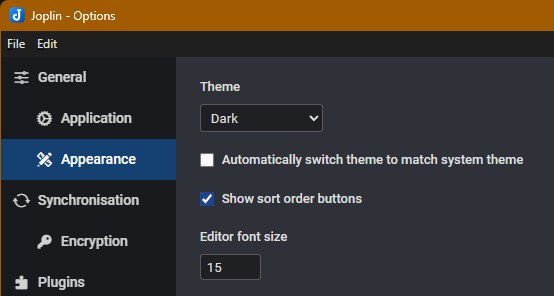
After upgrading to 3.4.6 the app title bar is now an ugly orange color. It used to be the same blue as all other apps using my Windows theme. I can't find where in Joplin to change / disable this. Changing the Joplin theme has no effect.
How / where?
Thanks.
Screenshots
Yup, pretty ugly. I simply closed Joplin and reinstalled v3.4.5 and it’s blue again.
This doesn't seem like an intentional change… Also, I think you may need to provide more information, as for me, at least on Windows 10, there is zero difference in the looks between v3.4.6 and the previous versions, including the title bar, which follows the system colour.
Edit:
Seems to be an issue under Windows 11. I've just tried on a different device running the OS, and the title bar indeed doesn't follow the system colour there, although in my case it's more like dark blue / indigo, not orange (while the system colour is on a reddish side).
Maybe the colour is wrongly inverted? For example, if you invert blue, it becomes orange (as shown here), etc.
It looks like this on my system. Looks like RGB is messed up.
Windows 11 specific.
May be bug in Electron?
I'm on windows 11 and there's no orange titlebar, it's the same as before
ah its the "show accent color on title bars" color setting, but for me it does show the correct color when I enable that, e.g. I have it set to slate and the titlebar is slate as expected:
EDIT: I forgot that I hadn't updated to 3.4.6 on this machine yet lol, there is definitely a bug, the color changed as soon as I updated:
If the color it's giving you is especially egregious, you can disable the show accent color in titlebar setting as a temporary workaround
Windows 11, dark theme, “show accent color” enabled.
Does this message in the Support forum qualify as a bug report? If not, where do I do that?