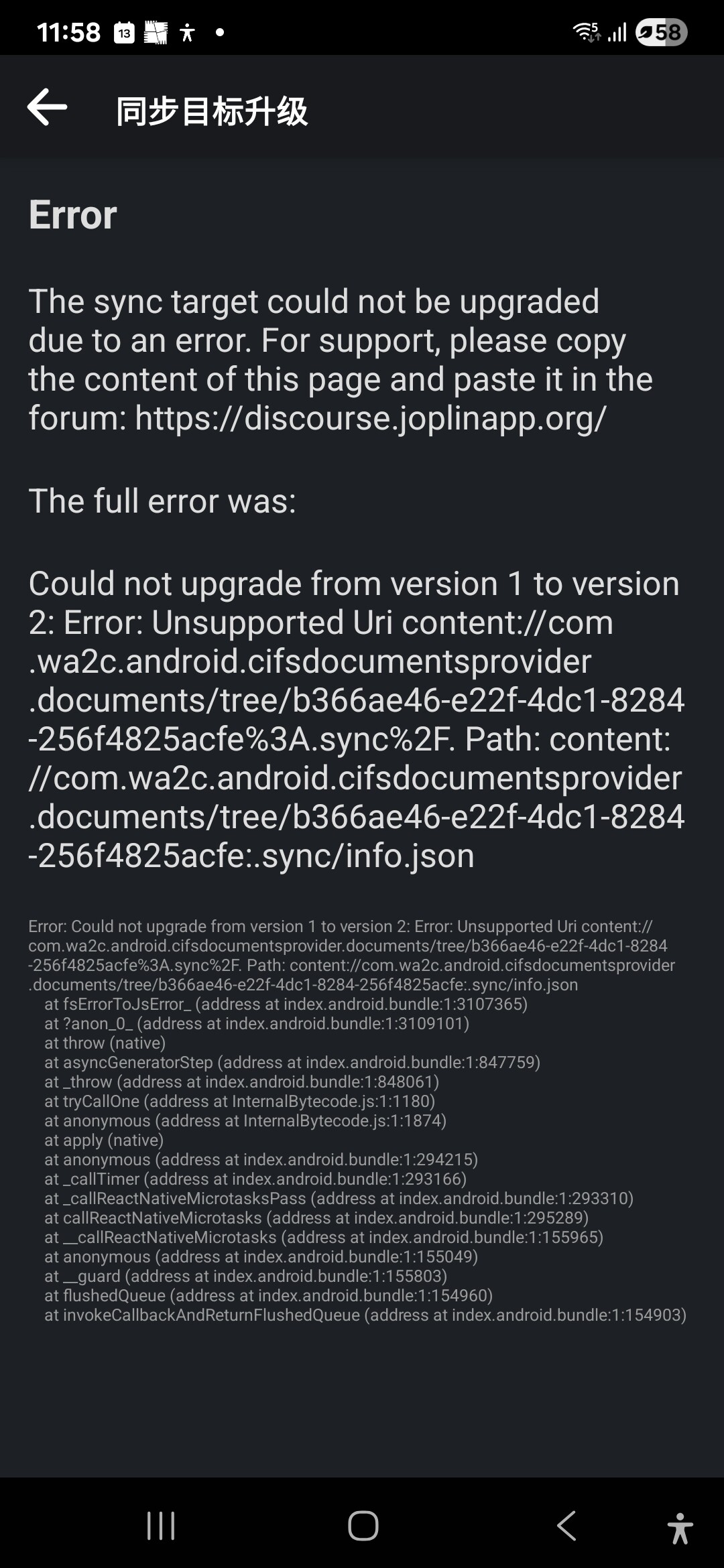
Sync problem with my Samsung A34 phone, which can't be synchronized with MyCloud via CIFS Documents Provider.
I don't know why and also how to resolve it.
Actually I misread that. I saw MyCloud and thought you were using webdav and thought CIFS Document provider was some means of enabling that.
I’m not sure file system sync on Android is going to work with anything other than the system default document provider - but even so you could try granting full access permissions on the account setup by CIFS.
If that fails to work, is it possible to set it up to use WebDAV on Mycloud instead? Using webdav on Joplin for Android is much better anyway, as you will get performance issues if you have more than 1000 or so objects if you use file system sync
Thanks for your favorable instruction. But unfortunately, MyCloud with OS5 is no longer supported by WebDAV, which is probably the best way for Joplin.
I tried many ways to sync Joplin on my phone (Samsung and Pixel) with MyCloud under the instrctions of AI:Gemini and Grok, and totally failed. I think there is a big problem with the Joplin Android. The sync between MyCloud and Mac & Windows is perfect!
I hope you can give me more suggestions about the sync. Thanks a lot.
Thank you for Introducing me to the CIFS document provider in the Google Play app store I need to take a look at it because I have been using a similar program that is hosted on GitHub that might be beneficial to you.
There is an application hosted on GitHub called RSAF. It is a document provider for Android and is powered by a well-known program that's open source called rclone.
RSAF is a document provider that runs rclone software that is normally only available on desktop platforms..
Nextcloud is a supported Cloud platform and I think it's done via webdav.
I’ve been using RSAF as a document provider for another Android app called cryptomator. It works well and so it might work for you as well here too.
I can provide you with any configuration assistance that you may need if you want to try it?
I wanna try it, which is a better way, I think. I need to make sure the RSAF is compatible with MyCloud(OS5, not supported by WebDAV. Now my Mac and Windows desktop are synchronized with MyCloud by smb.).
You will be very much appreciated if you could instruct me the procedures.
It sounds like you are using SMB successfully you on your desktop computers.
Tell me more about this my cloud OS 5 please. Are you referring to the Western Digital My Cloud Drive that is a network attached storage server?
RSAF does support SMB connectivity.
Considering that you're trying to use a document provider program on Android primarily supports SMB I'm going to guess that this is the protocol that you're going to want to use with RSAF too?
Mycloud’s information is as follows: Western Digital product, WD MyCloud produced in 2017(pic attached), OS5( which doesn’t support WebDAV), Firmware 5.31.102,
I aim to establish a platform that enables all devices, including Macs, Windows PCs, iOS phones, and Android phones, to be synchronized in WDMyCloud for Joplin. I successfully set the syncs among WDMyCloud, Mac, and Windows via SMB, but failed with Android phones(Android 15 and 16) and iPhones(iOS 18.6.1).
I am trying to sync phones and WDMyCloud, although I failed a few times. I don’t know RSAF. It will be a better way if the RSAF can do it. Can you give me a favor and instruct me on this?
@LeoW Have you actually tried using the RSAF app with Joplin? I set it up with a Box.com account and successfully got the RSAF provider to access files on the account. However, if I try to point Joplin to the relevant path, it seems to be impossible to make Joplin sync to it, because the file system sync path always remains blank after setting the RSAF provider path.
The error in the OP’s screenshot “Unsupported Uri” suggests you wont be able to get other document providers to work with the file system sync in Joplin, even if you do manage to get it to store the path
I primarily use rsaf with cryptonator a encryption program.
I'm charging up my testing tablet now and will try Joplin this evening after it's charged.
My guess is that you're not going to want to set it up as a sink but rather a direct file system and set up and let it right directly to the Cloud Server.
I will post the results of my testing when I get them.
As I just replied to @mrjo118 I am going to use my spare test tablet as soon as it's charged to simulate what you are trying to do and I will let you know if it works or not.
Basically it's going to work similarly to the program that you tried to use that didn't work right for you. I don't know what went wrong. What went wrong when you tried to use cifs?
Rsaf should allow you to see your Western Digital My drive has a local file system folder.
Well, I set everything up Joplin and the rsaf on my testing tablet.
Rsaf is a document provider and uses the storage access framework and I'm guessing that Joplin would need to be upgraded to support the storage access framework.
I couldn't figure out any way to get Joplin to see the rsaf remote that was connected to my storage.
Hi @laurent have you ever investigated the storage access framework document provider on android? Apparently your software would need to support that in order for Joplin to see the remote file system provided by rsaf. This would be a huge upgrade to the software because it would enable Joplin to synchronize with pretty much any cloud storage provider.
I'm sure everybody that uses Joplin on Android would love to be able to synchronize to any cloud provider or even in this case we're trying to use SMB. My File Explorer on Android and on my tablet in this case which is a Fire HD tablet can see rsaf as a document provider and my files on the Microsoft share but Joplin doesn't seem to be able to access that folder.
@LeoW Joplin is not a native Android app, it uses the react-native-saf-x node library to utilise saf in the app already, to do file system sync with the system default document provider. So I think the reason for it not working properly for cifs and rsaf is there is likely a limitation in that library, as I found the error the OP had with cifs came from a validation in that library directly, when I had a look into it
As to the question you mentioned above, I set the sync between CIFS and WDMyCloud successfully, and I can check the folder on my phone, which owns all the documents from the shared folder of WDMyCloud, but it failed to establish the sync between CIFS and the Android Joplin app although the shared folder of CIFS connects to the file system of doplin app sync configeration. I guess the problem is with the Joplin app, because I tried several methods such as CIFS, Syncthing, GoodSync, etc, and all of them failed in the same way.
I’m not good at software. I am afraid I can’t explain it clearly.
It is very, very difficult for me to set the sync between MyCloud and android Joplin, I have to give it up.
@Jimmyoo What myself and Leo W have concluded is that unfortunately Joplin does not currently support CIFS or RSAF, or possibly any other external document provider for that matter
I'm working on a new solution that may solve the problem for everybody. I'm going to put it through its Paces sometime today.
There is an app similar to RSAF that actually has been around a lot longer but based on the same technology from rclone.
The concept is to not use the document provider feature that doesn't work.
This other app has the ability to serve your data via webdav. If you run This program on your phone your data becomes available through a webdav URL that is supported by Joplin for Android.
If it appears to work I'll let everybody know what I did and how to replicate.
Do you mean Termux? I know that @thomasz86 has managed to get Termux on Android serving a local WebDAV server, in order to sync with Syncthing in a way that bypasses the performance issues with file system sync. So I suspect there would be no issues setting up rclone in it instead.
That solution should work well if you keep the Termux service running all the time and disable any battery optimisations, but I have no idea how complicated it is to setup. Also bear in mind if for some reason the your local WebDAV server is not running correctly, Joplin may report sync completes successfully when in fact the server is down.
There is an app on GitHub that has a full graphical user interface and is as easy to use as rsaf but is able to serve your remote configured files via HTML or webdav.
All you should need to do is tell Joplin that you're using webdav and point it to localhost:8080.
I can open a web browser and see my remote files.
Now I just need to test it out with Joplin.
If I get it to work I will post the link to the software here. I don't want to be premature and post software that doesn't work.
I’ve just had a go with an app called RoundSync which does what you describe, and it works like a charm with Joplin connecting via WebDAV. It was very easy to set up (tested with a Box.com account), easier than RSAF. I got it all up and running in about 15 mins without needing to connect to a pc to authenticate with the provider with rclone.
The sync with device and Box.com account within RoundSync was automatic and instantaneous, and when serving the WebDAV server it runs both a background and foreground service (the foreground service notification is dismissable on newer versions of android, but you can bring it back by stoping and restarting the webdav server). The sync within Joplin was a little slow to upload (just a little slower than direct sync to DropBox), but the download pretty quick, though the speeds may be dependent on which provider you are syncing to RoundSync. This seems to be a very good option to expand the mobile sync options, and it’s an actively maintained app. The only thing I havn’t really tested is how much the battery consumption is to keep the service running.
I did experience the issue linked in my previous post, whenever I stop serving the WebDAV server, but if you always keep the foreground service notification in the notification panel, then this should service as a visual indicator that the service is running and working (providing you set the correct credentials whenever you start the WebDAV server)
You win the prize for guessing the correct app that I have been testing. It’s Roundsync .
So far so good for me but I am going to put it under a heavier load a little later. If anyone else wants to test round sink here is the link to the software.
I would suggest configuring the software and then before you initialize a synchronization and I would make synchronization manual bring Roundsync into the foreground and then switch back to Joplin and initiate a manual sync.
I think this is the best way to get a reliable sync job done.
If this looks to be working for everybody it would enable anybody with the Android software platform to access a Joplin synchronization server on any one of the 50 or more Cloud providers that rclone supports.
I have been regularly using round sync to backup data from my phone to the cloud on a nightly basis. You can easily configure a synchronization job and then schedule that job to run on any interval you like.
The software works the only disappointing part is the developer has not put much effort into it in the last year. The version of rclone in the software is out of date now but it still works perfectly.
If there are any Android developers out there I think the repository has instructions on how to compile the software with a new version of rclone in it. I know it's possible because I did it once a few years ago. I don't remember exactly all of the steps for batam but I know I did it once so if there are any people out there that are comfortable Android developers and have the developer toolkit installed it would be nice to have newer version of round sync that has the latest version of rclone in it.
If you have any questions about how to set up roundsync I'm here to answer any questions you might have. I've been using the software for years. I use it on the desktop as well rclone i mean.