Hi everyone,
I'm a heavy desktop app user and I've been relying extensively on the wildcard search prefix [*] for my workflow (example: [*xamp]). However, I've noticed that this search functionality is no longer working for me.
My use case: I frequently misspell words, so being able to search by the end or middle of a word is crucial for verifying whether a note actually exists before creating a duplicate. This is especially useful when searching through links and references.
Questions:
Is there a way to restore or fix this wildcard search functionality?
Are there any alternative methods to search for partial matches within notes?
I've been thinking about designing an improved search interface for the Joplin desktop client and would love to collaborate with developers on this. If anyone is familiar with how the search functionality currently works and what implementation options are available, I'd be very interested in learning more and potentially contributing to the design.
Any insights or workarounds would be greatly appreciated!
Thanks in advance
If the wildcard would be at the end of the word (e.g. deskto* to find results for "desktop" or misspellings such as "desktol") you don't need the asterisk, you can just search for deskto, however deskto* should also work.
if the wildcard would be at the beginning of the word (e.g. *esktop to find results for "desktop" or misspellings such as "fesktop"), you would need to put a slash in front of the search term to switch from full text search to basic search: /*esktop)
NOTE: Forcing the basic search with / only works in the search box that's above the note list, it doesn't work in the Go to anything search.
Ok, thank you! The "/" basic search is exactly what I was looking for, so I'll use it instead of "*" going forward.
However, I'm a bit confused about what the intended behavior is, or if there are any other modifiers I can use to make my search experience even better. Let me try to illustrate how the current search seems to be working:
Example: The word in my notes is "BMW" written as BayerischeMotorenWerke (all together as one word)
Using "/" modifier:
/Bayerische - ✓ Finds it
/Motoren - ✓ Finds it
/Werke - ✓ Finds it
Using "*" modifier:
*Bayerische - ✗ No result
*Motoren - ✗ No result
*Werke - ✗ No result
Misspellings (something I do all the time, and I assume there's no modifier for this?)
Bsyerische - ✗ No result
Mptoren - ✗ No result
Warke - ✗ No result
Partial word search (when I know just part of the word I spelled correctly, but with a big chunk missing):
B*sche - ✗ No result (though I can use /sche as a workaround)
/M*ren - ✗ No result (though I can use /ren as a workaround)
/W*ke - ✗ No result (though I can use /ke as a workaround)
Any other search modifiers or techniques I can learn about to improve?
yeah it looks like with the basic search (starting search with /) it finds partial word matches by default, so you don't actually need to add the * wildcards
the asterisk in the middle of a word I don't think will work with either search, it will treat it as if the asterisk is one of the characters in the word
I looked into the search documentation and it's pretty helpful. Some of the search filters I'm definitely going to use.
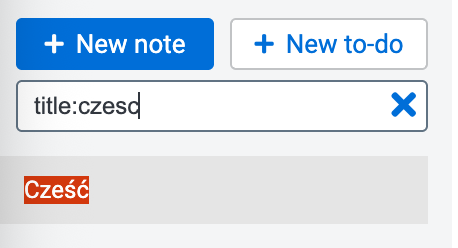
When I was looking at the documentation, I was wondering if there's a way to enable searching that ignores accents. For example, my native tongue is Polish and I'm trying to make all of my notes in English as I really need to search them. One of the features of my language are accents - for example Cześć - and it's pretty common that we're not using the accents all the time, as I can write just Czesc and it's the same. We do whole sentences without using accents, and it's hard to find the note as I need to search all the variations of the word, and if the accent is misspelled then I'll never find the word.