# Can I run a second instance of Joplin?
**URL:** https://discourse.joplinapp.org/t/can-i-run-a-second-instance-of-joplin/110
**Category:** Development
**Created:** [16 May 2018 05:17 UTC](https://discourse.joplinapp.org/t/can-i-run-a-second-instance-of-joplin/110 "2018-05-16T05:17:36Z")
**Posts on this page:** 7
**Page:** 4
### Author:  [@cleterrier](https://discourse.joplinapp.org/u/cleterrier)
#### Post date: [14 February 2022 12:48 UTC](https://discourse.joplinapp.org/t/can-i-run-a-second-instance-of-joplin/110/61 "2022-02-14T12:48:36Z")
... and it doesn't work either
---
### Author:  [@Zargron](https://discourse.joplinapp.org/u/Zargron)
#### Post date: [5 July 2022 02:33 UTC](https://discourse.joplinapp.org/t/can-i-run-a-second-instance-of-joplin/110/62 "2022-07-05T02:33:11Z")
Having enjoyed Joplin for a while, i reached for a feature that i assumed would be supported. In my case i wanted to edit a note in one profile whilst viewing a note from a another profile.
I'm very sorry to hear @laurent that such a fundamental modern structural feature of running two simultaneous instances of your application is so difficult to implement. I can't remember how many years ago i last contemplated such a weakness, (_perhaps that's a little harsh_). Umm... having to work around an issue such as this. We have been placing related notes, documents, spreadsheets, webpages and so forth side-by-side for comparative analysis on our monitors for decades. After writing text based software for a while, i wrote my first multi-window database application in the late 90's.
Are you trying to do too much with this feature too quickly? Having said that, i notice a Github thread on "multiple instance" starting way back in **June 2018**. Anyway, what basic features would give the community 90% of what they desparately seek?
Back in **November 2019** , @tsumare commented:
> rather than getting too bogged down in them, I would suggest as a first step, to simply make --profile work correctly. Everything else is dependent on this functionality anyway, and it would allow us to make use of the feature right away while everything else is nailed down.
I subscribe.
Hoping not to raise too much angst and with the risk of duplicating previous contributions...
1. Forget the mobile apps for the time being.
2. Forget the same profile being allowed in multiple-instances.
3. Simply allow each profile to have it's own instance.
4. Deploy as experimental / beta / use at your own risk or however you want to phrase it
5. Deploy with known caveats and warning that there will be more to follow
- users should be prepared to visit the relevant discussion threads to learn new nuisances
6. Only allow multi-instance through use of `--profile` param
7. Instruct users to configure separate non overlapping sync configuration for each profile
- do not worry about trying to block such a "mistake"
8. Do not mention multi-instance in your main stream documentation
- users will have search for then knowingly leverage the `--profile` param
- users should therefore be aware of the caveats, and if not, it will be their own fault
At some stage @laurent you wrote...
> At the moment, the app is limited to one running instance only ... this was to avoid people accidentally running multiple instances in the background, all syncing with each others.
I think i can appreciate how tricky this is to design, code and test. Don't bother with it at this stage. Just unlock the above so that on our desktops we can run a couple of profiles side-by-side. Please.
---
### Author:  [@zackles](https://discourse.joplinapp.org/u/zackles)
#### Post date: [19 July 2022 14:56 UTC](https://discourse.joplinapp.org/t/can-i-run-a-second-instance-of-joplin/110/63 "2022-07-19T14:56:08Z")
> [@Zargron](#):
>
> side-by-side for comparative analysis on our monitors for decades
That is why I ask for a separated render window here : [Desktop app: Opening/editing multiple notes - #53 by zackles](https://discourse.joplinapp.org/t/desktop-app-opening-editing-multiple-notes/1055/53)
If it is just read-only render (new windows only or another instance) there must be no lock-in problem or write competition on the database.
---
### Author:  [@benjaloo](https://discourse.joplinapp.org/u/benjaloo)
#### Post date: [12 August 2022 15:37 UTC](https://discourse.joplinapp.org/t/can-i-run-a-second-instance-of-joplin/110/64 "2022-08-12T15:37:46Z")
I think this question fits with this thread. I would like to use the portable desktop app in general, but be able to add notes via the command line, either
> mn "note text here" --file /path/to/file/attachment/here
> OR
> mn --use-clipboard-contents
If I understand correctly, the databases for the terminal app and portable version (and installed windows desktop version, too) live in separate places, so this would not be possible. Is my understanding correct? Would it be easy to implement the command line addition of notes as I outline above?
---
### Author:  [@Daeraxa](https://discourse.joplinapp.org/u/Daeraxa)
#### Post date: [12 August 2022 21:35 UTC](https://discourse.joplinapp.org/t/can-i-run-a-second-instance-of-joplin/110/65 "2022-08-12T21:35:15Z")
You can use the data api instead. There are examples on the forum using python scripts and all kinds of stuff.
---
### Author:  [@go\_green](https://discourse.joplinapp.org/u/go_green)
#### Post date: [13 September 2023 14:12 UTC](https://discourse.joplinapp.org/t/can-i-run-a-second-instance-of-joplin/110/66 "2023-09-13T14:12:37Z")
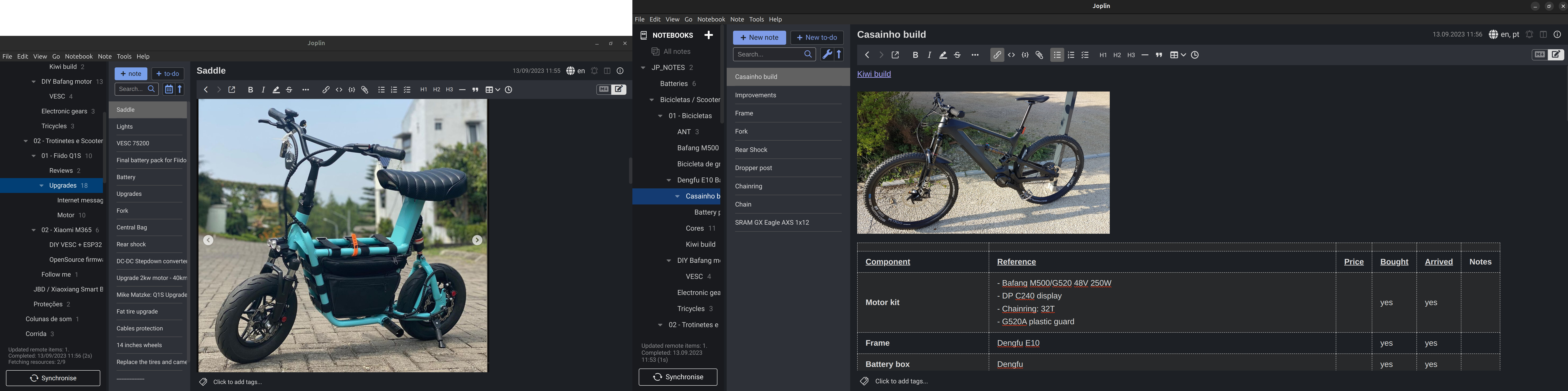
2 instances work well for me!!
I installed the version using the script and the other from Snap store. I have 3 monitors setup and sometimes I need to copy parts of information from on note to the other, so the best is to have an instance from one monitor and the other instance on the second monitor, like I am doing (note that the left monitor is like half of the size and resolution of the right monitor:
---
### Author:  [@chentao](https://discourse.joplinapp.org/u/chentao)
#### Post date: [29 June 2024 01:48 UTC](https://discourse.joplinapp.org/t/can-i-run-a-second-instance-of-joplin/110/67 "2024-06-29T01:48:08Z")
I managed quite easily to run simultaneously multiple instances (as many as you wish) on Linux (joplin installed through flatpak). Basically, it all boils down to run the same flatpak app within multiple home environments.
By default, Joplin's config folder is `~/.config/joplin-desktop/`. Let's say I want a second profile, that I want to launch simultaneously with the first. Let's call that profile `foo`. Note that technically it's not a second profile that I am creating, but a whole second home environment.
To do that :
- Create a folder `~/.config/joplin/foo`
- Copy Joplin's desktop launcher into a local one :
`cp /var/lib/flatpak/exports/share/applications/net.cozic.joplin_desktop.desktop ~/.local/share/applications/joplin-foo.desktop`
- And modify that launcher :
`Name=Joplin (foo) Exec=env HOME=/home/user/.config/joplin/foo /usr/bin/flatpak run --branch=stable --arch=x86_64 --command=joplin-desktop --file-forwarding net.cozic.joplin_desktop`
When you launch that app, the new profile folder will be created in `~/.config/joplin/foo/.config/joplin-desktop`
That way you can run as many instanced on Joplin as you wish
Note that in order to run Joplin's default profile, you have to run it first, and then the `foo` profile. For me, I don't use the default profile at all, all my profiles are isolated home environments in `~/.config/joplin` (`~/.config/joplin/foo`, `~/.config/joplin/bar`, and so on)
[Previous page](https://discourse.joplinapp.org/t/can-i-run-a-second-instance-of-joplin/110.md?page=3)